Showing posts with label SWTOR. Show all posts

Saturday, January 16, 2016

A Noobs Simple Guide to the SWTOR Outfit Designer

The SWTOR Outfit Designer feature added into SWTOR allows the player characters - not companions - to benefit from the appearances of wearable items - not weapons - regardless of the statistics of the items. This separation between appearance and statistics opens up many options for character appearance because without this many unique clothing items with poor stats would only be sold to vendors and never seen. However the outfit designer and its slots and stamping would benefit from a little more explanation than the in-game help provides. So this blog post just explains the basic capabilities that I have found in my experience with the feature.

Basic Feature Explanation:

You have gear and you have outfits. Gear is what you actually wear and all statistics are inherited from the gear. Gear is restricted based on armor type, class, etc. Outfits are appearance only and are created by "stamping" items into them. The statistics of stamped items do not matter at all.  So generally, if you like the look of an item you stamp that item into an outfit and activate that outfit.  If you like the statistics of an item you put that item in the gear slots rather than an outfit. If you like both the appearance and stats of an item then you might put it into the gear slot and not use an outfit at all, or you might put it into both an outfit slot and the gear slot.

Restrictions of the Outfit Designer (note - I am a subscriber so there may be additional restrictions for F2P and Preferred)

- Companions do not get outfits. Only the player characters.
- Only wearable items can be "stamped" into an outfit, not weaponry, carried items, or earpieces.
- Each character gets one free outfit slot. Additional slots can be purchased. If you really like characters having multiple outfits you may want to purchase the additional slots for your legacy rather than just one character. Stamping items into an outfit also costs credits.
- There is no means to duplicate an item in an outfit into another outfit. So if you think you will want the same item in multiple outfits make sure you retain the original item. If you sell it you will not be able to add it to any new outfits.
- An outfit does not need to have each piece filled in order to be applied. However, if you leave a piece out (for example, you do not include a head piece) then whatever is actually being worn on the body (referred to as "gear") will be shown. This can be worked around for the head slot because of the ability to hide what is on your head (each outfit has this option independently), but for other body pieces this can be a problem. Say for example, that you want to have your character's hands showing, then that would require that in the outfit you do not stamp any gloves and ALSO that in the gear you do not have any gloves. Because stats are applied only from the gear slots that means you will not have the benefit of gloves.  For this reason the Energy gloves and other items that are invisible have gone up in price in the Galactic Trade Market.

Some things that surprisingly are NOT restrictions:

- Clothing that is a type that you cannot normally wear can be used in an outfit. For example, a Sith Inquisitor who can only wear light armor can use a medium or heavy armor item in an outfit.
- If an item has a dye in it when added to an outfit, then the outfit inherits that dye. Once an item is in an outfit there is no connection between the original item and outfit "stamp", so you can freely change the dye in the original item or apply a dye to the stamped item in the outfit.
- Items that do not take dyes normally, can be dyed when part of an outfit.

Demonstrations:

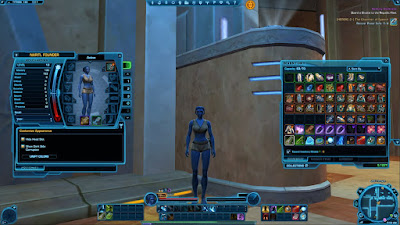
Here is Natiri, a Jedi Knight wearing the fetching Aspiring Knight clothing. She has all of the pieces that can be stamped into an outfit: chest piece, gloves, belt, pants, boots, and gauntlets.She is also wearing a helmet with the option to hide the head piece enabled so that it does not appear. At the top of the character dialog it says "Active" which means only that the clothing shown in this panel is what is appears on her character in the game. Important Note: The statistics of the items on this body panel are always what is actually used to determine the character statistics even if an outfit is active.

Showing what Natiri is currently wearing


At this point in the game I have decided that regardless of what other clothing items I find and choose to use, I want Natiri to continue looking like this. So it makes sense to create an outfit with these items. The ifrst thing to do is decide which outfit tab I want to use. So I click on the first outfit tab labeled "1".

Showing that Natiri's outfit 1 is empty


The information on the left indicates that I am currently looking at outfit 1 and what is currently active is the gear outfit from the earlier body panel. That the body pieces are all grayed out means that they are empty. The grayed items are shown only to indicate what appearance will be inherited if you do not put something else there when this outfit is activated. Note that the Customize Appearance options are specific to this outfit. Now that I can see that this outfit is available I need to put the individual clothing pieces I want to use into it. So I need to return to the original panel and do the first totally non-obvious thing, take off all of her clothing. This is necessary because you can only add items to an outfit from your inventory.

Natiri with her clothing moved into her inventory
Natiri with her clothing "stamped" into outfit 1
Last warning before charging the credits
Once the clothing items I want to "stamp" into an outfit are in Natiri's inventory I can return to the outfit appearance tab "1" and add them to the outfit.  There is no need to take off her helmet because I do not intend to add the helmet to her outfit. I instead leave the helmet spot in the outfit empty and hide the helmet using the hide head piece option.  If I later find a head piece that I like then I can add it to her outfit at that time, but there is no benefit in paying the credits to add a head piece I do not like to an outfit. Note that there is a cost in credits to stamping items into an outfit. Clicking "OK" in the last dialog will create the outfit and charge the credits. The "Activate on Modification" checkbox means only that the character should immediately be shown with the outfit changes you have made. Note that adding items to an outfit DOES NOT remove them from your inventory. That is because it is only copying the appearances of the items. Once an outfit is made you can do whatever you want with the items it is based upon.  They will however be bound to the character by the process of adding them to an outfit, so you will not be able to give them to another character.  You can add the same item to multiple outfits for the one character though.

Natiri now has an outfit created and activated based on the Aspiring Knight items
While it is tempting to think that at this point everything is finished, that is not the case.  The reality is that because I had to take off all of the clothing to move it into her inventory prior to creating the outfit, Natiri is still in fact naked and is not getting any of the statistics bonuses she would have from actually wearing these items, even though because of the outfit being activated she appears to be wearing them.  So after creating an outfit it is important to return to the body tab and put any items back on that are desired based on their statistics. Note: There is no need to press the "Apply" button after putting the clothing back on. Doing so means that you want the appearance to be based on the actual gear worn rather than the outfit.

Appearances can be deceiving. She is naked but looks clothed. Gotta fix that..

Her clothing is now back on. No need to press the "Apply" button!

At this point Nariti is wearing the gear that I want and also has the active outfit that I want so I am good to go. When I find gear with better statistics I can simply put it on in the body slot and her appearance will remain unaltered. When you look at gear the statistics comparison is always with what you are actually wearing not based on the outfit that is active.


Items that cannot be dyed normally, can be dyed when in an outfit


Items that cannot be worn due to armor type restrictions can be used in an outfit

Over all the Outfit Designer provides some interesting options for character appearance. This is all at a cost in credits of course and if you enjoy having multiple outfits then the cost can get high.  I have found that it is far more convenient though when finding items because even if an item doesn't look good you may want to use it because of its better stats and that is easily done as long as your character is using an outfit.

-------------
If you found this article useful and you choose to begin playing SWTOR or are already playing but have not yet indicated that you were referred by someone, then you can show your appreciation by using my personal referral link.  This will give both you and me in-game rewards as documented at the Friends of Star Wars site here.

Sunday, December 13, 2015

Thoughts on SWTOR 4.0 and 4 Years of Playing the SWTOR MMO

Load screen for SWTOR 4.0 Knights of the Fallen Empire

It has been just over 4 years since November 2011 when I began playing the beta release of the MMO Star Wars the Old Republic. Bioware has been actively updating the game and recently released version 4.0 Knights of the Fallen Empire which extends gameplay to level 65.  Players can continue using their current characters and begin the new content when they get to about level 60 or they can shortcut right to level 60 by creating a new character that begins at level 60. A level 60 character begun in that way starts with some 60 level unmodifiable gear that is fortunately legacy equipment and so can also be used by other characters of that player on that server as long as they are in the same legacy (why wouldn't they be?) and are level 60.
Sith Lord Siskin'lar contemplates the Universe


Siskin'lar Faces Challenges with Two New Friends?
Along with the new content which basically is designed for solo players to continue with an epic conquest or defense of the galaxy storyline (unfortunately the same storyline for every class, not unique class stories as there are for levels 1-60) there were also many changes made that affect all SWTOR players, primarily in an effort to further simplify the game and lessen the need for playing in groups. Not all of these changes have been welcomed by long time players and PvP players are especially disappointed, thus continuing the decline in the number of active PvP players.

The most significant changes made in 4.0 affect the unique class attributes and the companions. In my earlier blog posts on this I described the class system. In short each class had a key attribute that was most important to them for both offense and defense, so it was important to select gear for your character and his/her companions that matched the key attribute for their class: for Consulars and Inquisitors that attribute was called Willpower; for Knights and Warriors the attribute was Strength; for Smugglers and Agents the attribute was Cunning; and for Troopers and Bounty Hunters the attribute was Aim. Many objects in the game were designed around these key attributes, with drops, crafted items, special items like the datacrons, and vendor items all being affected by them. With 4.0 all four attributes were replaced with a single common key attribute named "Mastery". Because all the release did is change all references to Willpower, Strength, Cunning, and Aim to Mastery there are many duplicated vendor and crafted items in the game now and some rewards also make little sense. Honestly I'm not sure why this was done other than to make it simpler for new players at the cost of removing a lot of uniqueness and player choices (like, for example, a choice of spending limited credits on a Willpower based item for my Consular or an Aim based item for his companion; or the choice of whether to use limited craft resources to craft items for one attribute or another.)

The new Combat Support Droid in a Heroic mission
The second big change was to allow solo players to play most heroic missions, which typically required a group of players before.  Now a combat support droid will be available to assist your player in the heroics and there are also shortcuts on each planet to get right to the heroics. This seems to be an aid for people who enjoy farming heroics for credits and gear. There are still missions I have found though that mandate multiple players to participate, so this change does not affect all missions, but certainly most of them.

The third big change was to alter companions so that their statistics are all the same and are no longer affected by the gear that they have equipped. All companions can now be shifted among the standard Healer, Damage (DPS), and Tank play styles and so players no longer need to accommodate the proscribed play style of the companions they have. While this does allow some new choices for play style for the player character, (some really bad ones since the player class abilities remain designed for certain play styles) it removes most differences between companions.  The companions still have their own  unique storylines appearances, but otherwise they are completely replaceable. Because the statistics of gear is no longer significant for companions you can equip them in anything their class allows them to wear and you do not have to be concerned that the gear is better or worse for statistics. This opens the door to more variety for companion appearance because good looking items with low statistics that were typically just sold to vendors can now be used on companions instead with no adverse affect.

Jedi Landrus Wields the Force
This actually seems like a good thing and a Bioware developer stated that more variety was something they wanted to encourage with this change.  However, oddly enough, the new group of companions that are introduced as part of the 60+ KotFE storyline are exempt from all of this variety because you cannot change their appearance at all. They look exactly the same for everyone and the only item you can equip for them is their primary weapon. This seems like a very odd decision to make considering what they did to the class-based pre-level 60 companions.

The last big change I will talk about is the level synchronization that is now done on every pre-level 60 planet.  This means that players that are higher level than a planet is designed for will find themselves significantly reduced in hit points and damage capability when they are visiting. This prevents high level characters from going back to low level planets and wiping everything out, which is a good thing, but also means that if you are going back to a planet to do a mission you have to deal with local creatures fighting you again rather than ignoring you because of your high level, and this is a time waster and nets you almost nothing because their drops will be items that are too low for you to care about and worth little. It would have been better I think if they had made this leveling restricted to only when a player is not on a speeder. That way you could travel the planet quickly without being interrupted by local creatures unless you wanted to dismount and fight them for some reason.

Golfing in the Fallen Empire
Fore!


I continue to enjoy the game and believe that even as a subscriber it has been entertaining enough to be well worth my investment as a subscriber.  However I do think that the changes they have been making, other than reducing group requirements, have not really been a good match for my interests.


Cruising Aldaraan
Imperial Agent Dakton Taking Names
Imperial Agent Dakton in an alternate costume
Below are several of my over 40 characters, representing all 8 classes and several of the playable races.


-------------
If you found this article useful and you choose to begin playing SWTOR or are already playing but have not yet indicated that you were referred by someone, then you can show your appreciation by using my personal referral link.  This will give both you and me in-game rewards as documented at the Friends of Star Wars site here.  
-------------


Jedi Consular Sage
Jedi Knight
Republic Trooper
Sith Warrior
Smuggler
Jedi Consular Shadow
Jedi Consular Sage
Sith Warrior
Sith Inquisitor Sorcerer
Smuggler
Imperial Agent
Jedi Knight
Bounty Hunter
Sith Inquisitor Sorcerer
Republic Trooper
Sith Inquisitor Assassin
Sith Inquisitor Sorcerer
Jedi Knight
Sith Inquisitor Sorcerer

Friday, March 15, 2013

Comparing Neverwinter Beta to SWTOR

This is a brief assessment of Neverwinter Online having played it now on two occasions using two of the 4 classes it currently allows: Mage and Rogue. I haven't tried Cleric and Fighter and don't expect to. In both cases I played up to about 15th level taking several hours. I have posted this assessment also on the Bioware NWN2 forums in this thread.

I have very limited experience with MMOs other than SWTOR (Star Wars the Old Republic) which I have been playing for a year and now have 18 created characters on three servers. I also briefly played DCUO (DC Universe Online) and played for only one evening WoW (World of Warcraft) and STO (Star Trek Online).

For starters, I found the character graphics to be terrible. They look like NWN. That was fine in its day, but they should look far better now. As in any MMO you spend all of your time looking at your character's backside so it is important that they look good. They just don't. And you have very few options as far as armor or clothing and almost no customization ability (there is a way to dye armor but you have to find the dyes). DCUO does this best because you can easily create very unique looking uniforms and each time you get an item you get to keep the look of it if you want to even if you switch items. SWTOR is ok at this because the graphics are sharper and the number of clothing types is fairly large. But in Neverwinter everyone just looks bad.

Combat is incredibly repetitious. My mage could shoot an infinite number of magic missiles by my just holding down the left mouse button and all I needed to do was change who I was aiming at. You have only a few types of special hotkey attacks (by comparison in SWTOR you have well over a dozen) so you find yourself watching the cool downs all the time to see if you can use one again or have to go back to the left or right mouse button attacks that always work. The one feature I liked was that as a Tiefling I could teleport myself short distances while fighting in order to attack from behind or avoid being hit. This involved holding shift and pressing one of the WASD buttons. I found myself constantly hitting CAPS LOCK instead of shift and never got very good at it.

The UI interfaces are all lacking compared to SWTOR. In SWTOR you can bring up the map and turn your character while the map is shown, and even move your character while the map becomes semi-transparent. Not here. While the map is up you are frozen and as soon as you move the map is gone.

The follow-the-sparkles way of getting to quest areas was buggy. I had to frequently press the Z key to make them reappear. And sometimes you just have to walk around blindly until they show up. Again, the SWTOR map and functionality is far superior.

Unlike SWTOR where the areas are huge and you can easily navigate around mobs you do not want to deal with, Neverwinter is cramped - almost claustrophobic - and I often found myself accidentally fighting 2 or 3 mobs at a time just because while fighting one mob I accidentally got too close to another. There is no death penalty though, you just get sent back to the last healing campfire you used.

The UI for shopping is also inconvenient. Things that should be simple are not. Like the fact that to start a conversation with a vendor you need to press F but to end the conversation you have to move your mouse to the "Finished" button instead of just pressing F again.

While I only experienced 2 crashes to the desktop, I had to logout and back in several times to correct odd graphic glitches. Most irritating is that after being killed my character's running would be affected. Once he was running sidewise all the time and another time he looked like he was moon-walking. Logging out and back in was needed to correct this.

I also experienced a large amount of rubber-banding, which is when you are running and all of a sudden you are moved back a second or two from where you were. This happened all the time and in some cases I would end up in a completely different room of an interior.

The nice thing about the game is the chance to see what 4e Neverwinter should look like. That should prove useful as I am (still) working on my Gems of Power campaign which takes place at the same time as Neverwinter and the city of Neverwinter was going to be one of the cities I allow travel to. Of course with the NWN2 toolset I won't be able to do everything, but I think the visuals from Neverwinter may help.

I haven't been able to use the Foundry yet, but I'm hoping it offers a decent alternative to the NWN2 toolset. I am certain the NWN2 toolset will be more capable, but the reality is that if you want people to play something you build you have to use the platform they are on. Besides, maybe if some of us NWN2 modders build some good Foundry content it may lead people to try NWN2 out.

I don't see myself ever being a regular player of Neverwinter though.

Saturday, March 24, 2012

SWTOR Reflections after one month in


Star Wars The Old Republic (SWTOR) has been consuming much of my free time for the last month, allowing me to level up two characters to level 20 and one to level 10. So here are some tips I've learned as well as my general thoughts on the game so far.

[Update: As of July 2013 I now have 18 characters spread across 3 servers. My highest level character currently is level 43.]

First the interface of the game assumes quite a bit of knowledge in order to function properly. My guess is that that knowledge comes naturally to players of other online games like World of Warcraft, but may play a long time without knowing about helpful things that should be obvious.  Here are a few examples:

Managing Your Companion

Regardless of what class you select for your character you will eventually be assigned a companion who will follow you around and assist you, generally around level 8 or so.  They also irritatingly get in your way especially if you are using skills like Archaeology and Slicing which require clicking on things you find in the world frequently. [Update: There is a preference setting that allows you to turn off companions using the gathering skills.] The interface allows you to do a number of things with your companion but they aren't obvious.

Dismissing your companion: You can dismiss your companion at any time. Based on what I have seen if you fight alone you will gain more xp than fighting with your companion's aid, so this is one valid reason to dismiss your companion. Another reason to dismiss is if your companion has died in battle, especially if you ran away from the area in which he/she died. Companions can be summoned at any time except in battle, so there is no risk to dismissing your companion. To dismiss a companion right click on their portrait in the lower left corner of the screen and select the dismiss option from the pop up menu. I have found that some of the main plot scenes expect your companion to be present and if he/she is not you may encounter a bug. So before going into a major plot area you may want to summon your companion. [Update: Often you will be told that you cannot start a conversation without a specific companion present, in which case you must summon the companion and then re-initiate the conversation.]

Summoning or switching your companion: If you have dismissed a companion and want to summon the companion back just click on the little button attached to the lower left edge of the empty companion portrait in the lower left corner of the screen. When you summon a companion he/she will be at full health, so if your companion has died or been seriously damaged it may be faster to dismiss and summon than to heal him/her. If you have multiple companions and want to summon a different one you can open the crafting window that allows companion summoning by either pressing N or clicking on the button in the upper right edge on the companion portrait in the lower left corner of the screen,

Resurrecting your companion: If your companion has died in battle and you want to resurrect him/her just right click on his/her body. If you are not able to get to where the body is then just dismiss the companion and summon him/her again and he/she will be teleported to where you are. You don't need to have the icons for revive companion in your quickslot bar.

Clothing/Equipping your companion and/or changing their appearance: This has been my experience with the non-human companions assigned to the Jedi Consular, Jedi Knight, and Sith Inquisitor, but I suspect it applies to all companions. Companions can be given clothing you find or purchase (tip: even clothing that is "bound" to you can be given to a companion) to improve their stats by opening the character window (press "C") and clicking on the companion tab and then dragging items from your inventory the same way you would for your main character, but depending on their appearance they may not display the clothing you give them. To give them a different appearance you have to buy the alternate appearance sets from the companion vendors and drag it in their special appearance slot on the companion tab of the character window. The sets are expensive but you can get a preview of what your companion will look like without purchasing them by ctrl left-clicking on the set. While the alternate appearance sets are rally the only option for changing the appearance of non-human body type companions like Khem Val, they can also be used with human body type companions to alter their faces. There has been a long-standing bug though that if you have an appearance set and then try to preview an item on your companion the preview window will not appear correctly. To get the preview window to work properly you may have to remove the appearance set. Fortunately there is no cost to temporarily removing an appearance set.

Giving your companion gifts: You can find items that would be suitable gifts for a companion. It will say in the item description that the item is a suitable companion gift and whether the current active companion will appreciate it or not.  You can also buy companion gifts from the companion vendors. To give a gift to your companion just right-click on the gift. The point of giving gifts is to improve the affection of your companion for you which can improve crafting skills and advance the companion storyline. If none of your companions appreciate a gift you may want to store it in your cargo hold for a later companion.

Speaking with your companion: Sometimes your companion will have something to say to you. If so then there will be a little talk icon on their portrait. They will not talk to you however unless you are in a cantina or on your ship. Once you get to a suitable talking place right click on the companion (not the companion portrait) to initiate the conversation. Generally what they have to say is either inconsequential or advances their personal storyline.

Sending your companion on missions: Your companion can be sent on missions based on your gathering crew skills. To see what missions are available you press N or click on the little button attached to the upper right edge of the companion portrait. This will open a window with a list of available missions. Missions are divided into difficulty levels. Sending your companion on a mission will make the companion unavailable for some length of time, usually just a few minutes, and cost you some credits. When he/she returns you will be told whether the mission was successful or failed and what you earned from it. Sending your companion on missions seems to be the cheapest way to find rare materials needed for crafting items.

Using your companion to craft items: Once you have a companion and get off the first planet you can learn crew skills from crew skill trainers. Subscribers are restricted to 3 skills: 2 gathering skills and 1 crafting skill. Even though you can eventually have more than one companion, you remain restricted to only 3 total skills. When you start a skill you have no points in that skill. As you use the skill you gain points and that allows you to do better with the skill. When your companion crafts items, which will require specific resources depending on the item being crafted, you gain both the item and increase your crafting skill. Crafting takes time, tying up your companion for a minute or two, but doesn't cost any credits. Subscribers can queue up to 5 actions on up to 3 companions, so if you want you can give them several crafting commands and then forget about them for several minutes. To initiate crafting you can click on the Crew Skills icon or click on the icon in the upper right portion of the companion portrait. Crafted items can be sold in the Galactic Trade Market because they are not bound to your player until you equip them. They can also be emailed to other characters as long as they are on the same server. Also there is a chance that you may craft an "excellent" version of an item, which means that an augment can be installed into it to increase its abilities. You can also use reverse engineering on crafted items, which reduces them back to part, but not all, of their basic components. The advantage of reverse engineering items you have crafted is that there is a chance that you will automatically learn the ability to craft a better version of that item.

Using your companion to sell excess items: If you have a lot of "junk" items in your inventory you cannot use (gray outlined items serve no purpose except to be sold for credits) then you can order your companion to go sell them for you by right clicking on the companion portrait and selecting the sell junk items options from the pop up menu. The companion will leave for a minute to sell them and then return. This can be handy if you are far from a vendor.

Using the Galactic Trading Market to Buy and Sell non-bound items

You will find many things during your adventuring that you cannot use or use for only a while. You can sell these items to vendors but they do not pay well. A much better way to earn credits on items you are not bound to is to offer them for sale in the Galactic Trade Market. To use the Galactic Trade Market you have to go to a Galactic Trade kiosk, which can be found on the main map (press "M"). (There are no kiosks on the starter planets though). At these kiosks you can both purchase and offer items for sale. When you offer items for sale it will default to a reasonable price, which you can then choose to increase or decrease. You also have to put up a percentage of the price yourself to cover your offering. If the item sells or expires you will regain the amount you put up, but if you cancel your offer to sell you lose those credits. This means that you are somewhat limited to how many items you can offer for sale since you have to have the credits to cover them.

If an item sells then you will receive an email with the number of credits attached to it. If the item expires without selling then you will receive an email with your item attached to it and the number of credits you put up. These emails do not seem to automatically expire, so this may be an option for extending your inventory.

Expanding Your Inventory

Unless you sell things frequently you will fill your inventory in no time. There are options to expand your inventory by credits and cartel coins but there are also free options. While you do not gain a ship until around level 15, you can access a cargo hold earlier than that by going to fleet. Travel to fleet becomes available around level 7 but isn't really intended until after you complete the initial starter planet at about level 10. The ship cargo hold is accessible from kiosks at fleet and on most of the planets except the starter planets. Other alternatives are to email your items to another character or post them on the Galactic Trade Market, but due to free-to-play restrictions on email attachments and GTM postings these options are not very useful except to subscribers.

Gaining Crafting Recipes

As you gain in crafting skills you will have access to additional recipes to be used for crafting. However to get these you need to go to the crew skill trainer and purchase them.

Gaining Class Abilities

When you level up you go to your class trainer and pay to gain your class abilities. After you reach level 10 you will have to choose a secondary class. This choice is made by speaking with someone at fleet. After that when you go to your class trainer make sure that you click on the tab for your secondary class to purchase its new abilities as well. Your choice of advanced class will restrict what kind of armor, weaponry, and skills you can use and the choice is not reversible. Only certain classes can wield a double-bladed lightsaber like Darth Maul (specifically Jedi Consular with Shadow advanced class and Sith Inquisitor with Assassin advanced class) or dual-wield lightsabers.

Repairing Your Items

As you fight your armor and weapons get damaged. If left unrepaired they will eventually become unusable. To repair your items and those of your companion go to any vendor or Medical Droid and click on the Repair All button in the bottom left corner of the store window. Better to pay for repairs than to lose your items.

Modifiable Items

The game includes items that can be modified so that they can improve in their stats as you level up your character. Orange items are items which have an orange border around their icon as shown in an inventory screen and these items are always modifiable. Generally these are either armor/clothing or weapons. Unlike most of their non-orange counterparts, orange items can be customized by adding modifications which can be purchased from vendors or the Galactic Trading Market or crafted. Modifiable gear of a type always has the same base stats as other modifiable gear of the same type, they only differ in appearance. So that worn double-bladed lightsaber is equivalent to the fancy orange double-bladed lightsaber you can buy for 14 commendations in everything except the appearance. The point of modifiable gear is that if you like the look of certain armor types and weaponry you can upgrade their modifications as you level up and retain the same look. If you want to see what an item will look like on your character before purchase use ctrl left-click on the item. In some cases it is cheaper to purchase a modifiable item with modifications in it than to purchase the modifications separately. It costs nothing to install a modification into a modifiable item, but unless you want to destroy the modification it replaces you have to first extract the existing modification, which does cost some credits (at a reduced rate for subscribers). Once extracted modifications can be used in other modifiable items or can be reverse engineered to reduce them to some of their basic components.

Originally extracting and installing modifications required using a modification station, but that restriction was removed and modification stations are now mainly extraneous as they are needed only for adding augmentation slots to items. To modify any modifiable item at any time just ctrl right-click on it in your inventory or the character screen (if it is equipped).

While orange items are always modifiable there are items in the game that are other colors such as blue, green, and purple that are also modifiable. So do not assume that just because an item is green it is not modifiable - even though most green and blue items are not.

General Chat

The General Chat feature of the game is quite disturbing. Though there is a profanity filter, there is little point to using it because gamers are experts at getting around filters. The general chat at any place where there are large numbers of players such as the starter planets, capital planets, and fleet is completely filled with sexual and pornographic statements, trolls posting meaningless garbage and spam, noobs asking the same questions over and over (how do I change my lightsaber color, when do I get a speeder, when do I get a ship, when do I get an advanced class, where is my second lightsaber, how do I quit a guild, how do I get unstuck, etc.), non-noobs repeatedly chastising and belittling noobs for doing so, WOW fanbois going on endlessly about pandas, KOTOR fanbois going on endlessly about Revan, PVPers complaining about SWTOR PVP ad infinitum, and Star Wars über-nerds arguing about whose lightsaber is longer ad nauseum. There are two remedies to this, one is to get away from these places as quickly as possible, and the second is to click on the Other tab in the chat window. If there are specific people you want to avoid seeing in General Chat use the "/ignore" command to add them to your ignore list. This will block you from seeing their posts and also any group invites they send to you.

Some Useful Tips

If your character gets physically stuck, open the chat window (upper left corner) and type /stuck. This will move your character for you, usually to a spot where you are not stuck. If that doesn't work then try using your speeder if you have one. Or try transporting yourself to another location. Or get someone nearby to duel with you. Or logout and log back in.

You get experience for speaking with each crafting skill vendor at fleet. So speak with each of them before selecting your skills. Your codex will be updated with information about each crafting skill and you can use that information to make your choices. Crafting skills can be changed later.

There is a shortage of purchasable resolve modifications (high in willpower, which is best for Jedi Consulars and Sith Inquisitors).

Some of the Datacrons give you colored matrix shards instead of stat bonuses. These can be combined in special locations to create relic items which can be equipped to improve character stats.

While armor type (light, medium, or heavy) is restricted by class, when you choose a secondary class you may be able to use armor you weren't able to before. Also you can equip your companions with items you yourself cannot use. So you may want to hold on to some items that you cannot use so that you can make use of them later.

You can expand your inventory by paying 5000 credits. This will increase the inventory by one additional line of items. To get another line you will have to pay 20000 credits.

There isn't any point to holding onto planet commendations. You can spend them on their respective planets but there are also commendation vendors on the space station. Initially commendations were planet specific, but now they are interchangeable so you can go to a lower level planet and farm Heroic missions for commendations.

The purpose of a guild is to allow similarly minded people to play together and pool resources. Guilds can be started by anyone as long as 5 people agree to join. You can join only one guild at a time. The slash command to quit a guild is "/gquit".

Grouping is useful for accumulating social points and completing Heroic missions that often require 4 players. To invite someone to a group use the slash command "/invite". To leave a group right click on your portrait and select the Leave Group option. When you are in a group and a chest is opened or other item drop happens and there are items that are green or better each member of the group has a chance to claim or pass on the item. Appropriate group etiquette is this: You should only indicate "Need" when the item improves the primary stat of your character (Willpower for Consular and Inquisitor, Strength for Knight and Warrior, Cunning for Smuggler and Agent, Aim for Trooper and Bounty Hunter) and and you plan to wear it immediately. If you do not "Need" the item but it would improve the primary stat of your active companion then select "Greed". Otherwise you should pass on the item so that someone else in the group who needs it will get it.


General Thoughts on the Game

While the game areas are expansive, just as the Star Wars sets are, the game places quests in such a way that you spend an enormous amount of time running around. Perhaps this is a mechanism to keep people from staying on a planet beyond their level by driving them off with sheer boredom. I've seen people with personal speeders but I do not know how to get one.

The quests are all very similar. The basic quest format is: retrieve x number of thingamajigs from y different locations and deliver them to z other locations, killing n opponents along the way, and then return to the quest giver for reward of some experience, credits, and an item or two. The only difference as you level up is that the opponents you face are tougher or more numerous. So frankly, it gets boring. After playing two characters to level 20 and one to level 10 I'm already tiring of it. There are a large number of skills that you gain as you level up to about level 35. After that leveling up usually just increases the power of your existing skills.

The game intentionally makes it difficult to play by yourself. The game expects you to join up with friends or strangers and there are things you cannot purchase or find without doing so. I prefer not to do that and the one time I have so far I experienced several crashes and ended up abandoning that quest. While most of the Heroic areas that are expected to be done by a group can be done solo you will need to be several levels higher than the recommended level to have a chance of success. But there are still some things that require being in a group.

One of the seemingly optional things you can do is find the Datacrons, which are powerful artifacts spread around the galaxy that give you bonuses to your basic attributes. There are websites online that will show you exactly where they are, so finding them isn't that difficult. But unfortunately most of them require mastery of jumping and any misstep requires starting over from the beginning again, so expect to spend several frustrating hours getting to some of them.


-------------
If you found this article useful and you choose to begin playing SWTOR or are already playing but have not yet indicated that you were referred by someone, then you can show your appreciation by using my personal referral link.  This will give both you and me in-game rewards as documented at the Friends of Star Wars site here.  
Monday, February 20, 2012

Adventures with Star Wars The Old Republic


Last November I was invited to participate in the beta testing of Star Wars The Old Republic, a Bioware MMORPG set in the Star Wars universe. I had no experience with MMORPG's but decided that since the price was right, that is free, I could spare a weekend to test it out. On my Mac of course, despite the game only being available for the Windows platform.

Having never played a MMO-anything before I found the experience to be somewhat irritating. Other players, without so much as a by-your-leave, would rush in and kill creatures I was planning to exterminate myself. Only once did a stranger heal me. And most of the chatting seemed to have little to do with the game.

In terms of playability though I found the game to be very playable as long as I was using Boot Camp. Playing using Parallels 7 was more prone to failures. Playing in Boot Camp resulted in failures only after several hours of play. Over all, while I enjoyed the weekend play I decided against buying the game.

After watching the re-release of Star Wars I in 3D in the theatre I reconsidered my decision and since there is no Mac version available at this time, I bought the Windows version. Since I had the beta installed I thought I would be able to get started with a simple update, but unfortunately after updating I found that the game would not go past the launch page.  So I re-installed the game from the discs. Unfortunately after that I still found I could not get past the launch page.  I searched about online and found that someone else was reporting the same problem, and like me had been a beta tester. So I wiped the game completely from my Boot Camp partition and downloaded in from their website. It took 3 days to get a complete download because it would fail multiple times during the download claiming that files needed to be "repaired". I started the process on a Tuesday and although I ran it continuously it didn't complete until Friday morning. A good workout for Windows XP, since I think that is the longest I have run Windows XP on my Mac without rebooting.

Fortunately I have had no problems playing except for occasional crashes to a blue screen. This has happened only a few times in a weekend of play and recovery is generally painless because the state of your game is being saved on the server. A quick reboot and I'm back to within seconds of where I was when it crashed.  My Jedi Consular is now up to level 10 and so far I am enjoying it. My understanding is that for the first 10-15 levels you play the provided storyline and then after that you have more freedom. So basically the first 10-15 levels are like an extended tutorial. You can create multiple protagonists so I will be creating a Sith as well so that I can experiment with their powers and storyline. There are 8 possible protagonists (4 light side and 4 dark side) and each has its own storyline, with some quest overlap.

The hardest part for me so far is that I do not like the interface. You have to use the WASD keys to move your character and the mouse (or key commands) to initiate actions such as attacks. I would far rather point the mouse at where I want to go, a la NWN2.

At this point a few people have tried to get the game to play in a Wineskin, so that Windows is not required, but according to doh123 Bioware changed something between the beta and official release that Wine cannot handle. So at this time the best option for Mac owners is to use Boot Camp and Windows.


-------------
If you found this article useful and you choose to begin playing SWTOR or are already playing but have not yet indicated that you were referred by someone, then you can show your appreciation by using my personal referral link.  This will give both you and me in-game rewards as documented at the Friends of Star Wars site here.